Blog
Buying Bitcoin is easy. Custody is the problem - From exchange to multisig.
Most people come into Bitcoin the same way. Open an exchange account. Set a password. Buy a little. Maybe trade a little. It feels smooth. It feels modern. For a while, it even feels like the job is done.
Then the real problem shows up.
Not the buying part. The custody part.
Because once your stack becomes meaningful, whether that means life-changing money or just an amount you really do not want to lose, “convenient” starts to feel fragile. The question changes too:
Who actually controls the keys?
I learned that lesson fairly early. Exchanges fail. Policies change. Access gets interrupted. Mt. Gox is the famous example, but the broader lesson matters more than the history lesson: if somebody else controls the keys, you are depending on their competence and their continued existence.
That was the point where “not your keys, not your coins” stopped sounding like a slogan and started sounding like an operating rule.
This post is my custody journey, from the early “I’ll just do something simple” phase to a setup designed to survive mistakes, accidents, and time. No step-by-step tutorial here. Just the mental model, the tradeoffs, and the way I think about risk now.
The first custody upgrade: move from “account” to “keys”
An exchange is great UX. It is also a dependency. Your access depends on their availability, their policies, their security, and sometimes their interpretation of your identity.
Self-custody flips that:
- you control the secret(s)
- you control the spending policy
- you can verify your setup independently
But beginners usually underestimate one thing:
Custody isn’t a device. It’s a system.
The moment you self-custody, you also take ownership of backups, recovery, physical security, privacy, and long-term survivability — congratulations, you’re now your own Chief Security Officer.
My early phase: “brain wallet” (and why I stopped)
Years ago, I used a “brain wallet” approach (using tools like https://www.bitaddress.org/): I had a secret sentence in my head, and that deterministically generated a Bitcoin wallet.
It worked for me for years. It also had two huge problems:
- Security risk: humans create secrets that can be guessed or brute forced.
- Continuity risk: if the secret lives only in your head, you’re a single point of failure (accident, illness, forgetfulness, death).
My second mistake: “I’ll back it up in the cloud, encrypted”
Later, I realized my brain password was too short, so I extended it to 30+ characters to withstand brute force. I migrated that wallet to something more secure, but I was still the main point of failure.
So I decided to back it up. I saved a wallet PDF, compressed it into a password-protected ZIP (standard ZIP), and stored it on a cloud drive.
Unsurprisingly, that setup eventually got compromised, and the file was gone.
I got lucky because I named it in a strange way, so it wasn’t obvious it was Bitcoin-related. But luck is not a custody plan. If someone had targeted it, brute force could have been a real concern.
So my rule became blunt:
Don’t store wallet secrets (or anything that can recreate them) in cloud drives.
- You don’t fully control access (accounts can be blocked/locked).
- If someone gains access, your “offline advantage” disappears.
If you encrypt files for other purposes, the details matter (ZIP vs AES-256, for example). But for Bitcoin custody, my conclusion stayed simple: offline, physical security.
Hardware wallets: strong step, but backups become the real problem
Once hardware wallets became mainstream, I moved from “brain wallet” to cold storage — and that also changed how wallets are typically generated: instead of a single password, you usually get 12–24 words from a known dictionary, and those words form the secret most people call a seed (or seed phrase).
Hardware wallets are powerful because your private keys do not need to touch an internet-connected computer. They also add practical protections:
- PIN (device access control)
- Passphrase (an extra secret on top of the seed — often described as a “25th word”)
That is great. But it also reveals the trap:
The backup becomes the most important thing to protect.
If someone steals your seed phrase backup, they can recreate your wallet. If you lose your device and your backup, you can lock yourself out, and congratulations, you have just reinvented the 9-to-5: start from zero and stack again.
So the key question becomes:
How do you secure the backup without creating a single point of failure?
Not all hardware wallets are the same
My first hardware wallet was Ledger (https://www.ledger.com/). Back then, the fact it supported lots of coins felt like an advantage. Today, for my use case (Bitcoin only), I do not see that as a benefit anymore. BTC-only wallets tend to have a tighter security focus and a smaller attack surface.
Later, Ledger introduced a subscription recovery service designed to help users recover access by splitting and storing encrypted fragments with providers — and that goes against the Bitcoin ethos for me, so I wasn’t fine with it.
I personally chose not to rely on that model for my long-term custody assumptions, so I moved away from Ledger.
Why I like Trezor for simpler setups
For simpler setups (or for less technical users), I like Trezor: https://trezor.io/
They lean hard into an open-source mindset: their software and firmware are intended to be auditable, and transparency matters in Bitcoin custody. They also offer a Bitcoin-only firmware option, which can be a nice fit if you want to reduce complexity and focus strictly on BTC.
Trust is always part of the conversation in Bitcoin. I prefer tools where the security model is clear and openly scrutinized.
When your stack grows: multisig reduces single points of failure
If you are storing meaningful amounts long term, a single-seed wallet can start to feel too fragile. That is where multisig becomes attractive.
In Bitcoin, a 2-of-3 multisig means you have 3 independent keys, and any 2 can spend. There are plenty of other quorums too (e.g., 3-of-5, 3-of-7, etc.) — 2-of-3 is just a common starting point.
The point is not “more complexity is always better.” The point is simple: one key can be lost or stolen without you losing everything, because you can spread risk across keys, locations, and people.
What I typically use (high-level)
- Sparrow Wallet as the “coordinator” (a desktop app that helps you see your wallet, prepare a send, and coordinate signing across your devices): https://sparrowwallet.com/
- SeedSigner (a small, stateless device that lets you temporarily load a seed/private key, sign transactions offline, and export the signed result back to your computer — and because it’s stateless, you can reuse the same device to work with many different paper/steel seeds across multiple wallets/setups): https://seedsigner.com/
And for one of my keys:
- An air-gapped signer (example: Coldcard Mk4) for a tighter security posture — “air-gapped” just means it can operate without a direct wired/wireless connection to your computer, so signing happens offline and only the signed data is transferred. Coldcard official site: https://coldcard.com/
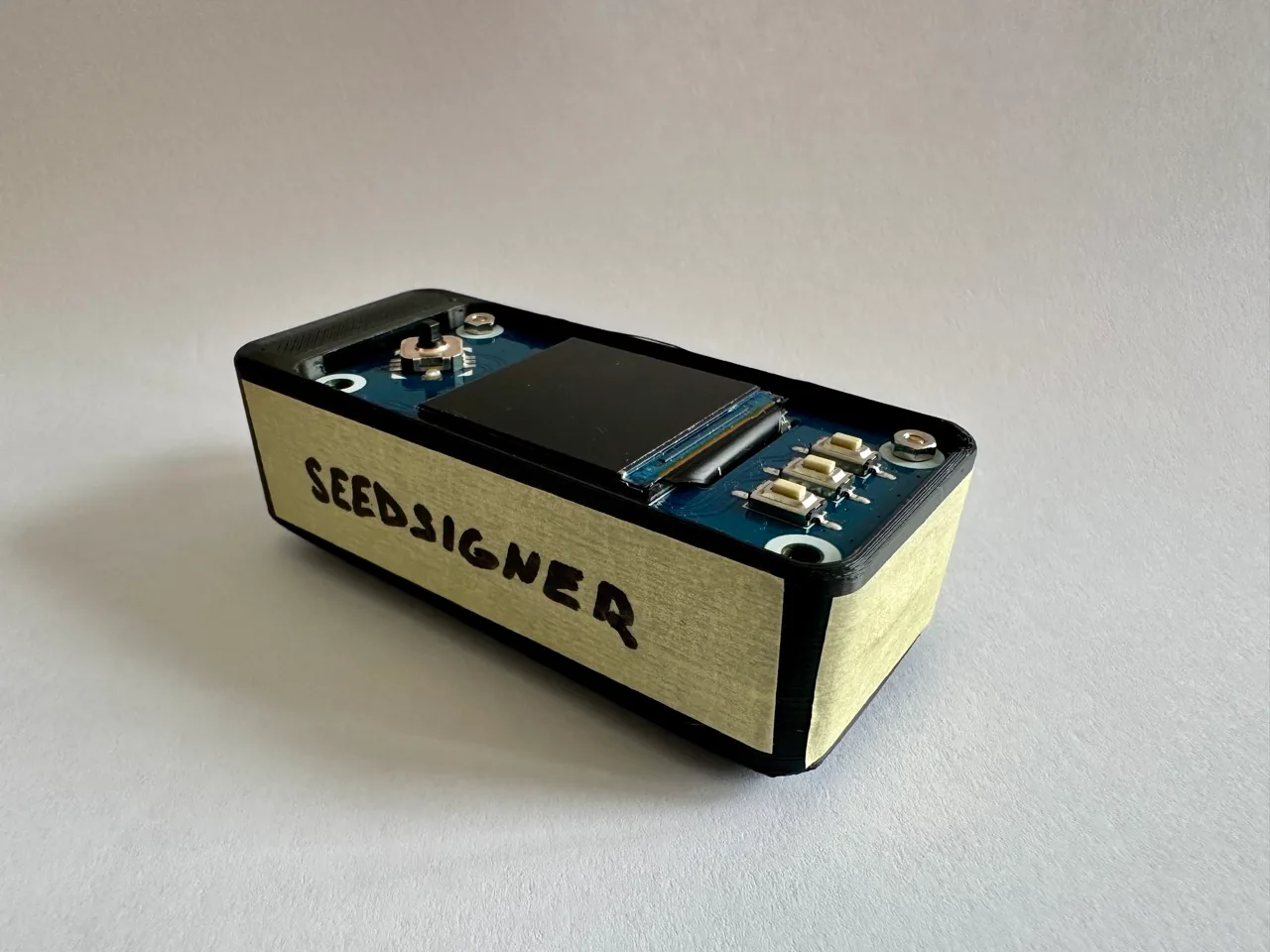
Custom-built Seedsigner.
The hard part isn’t multisig. It’s storing the secrets.
Creating a multisig wallet is the easy part. Storing it safely for years is the hard part.
With 2-of-3 multisig, you already have:
- Seed 1, Seed 2, Seed 3
If you add passphrases — think of a passphrase as an extra secret on top of the seed that unlocks a different wallet — you now have:
- Seed 1 + Passphrase 1
- Seed 2 + Passphrase 2
- Seed 3 + Passphrase 3
That’s six secrets.
And then there’s an often-forgotten piece:
- the wallet descriptor (the “description” of how the wallet is constructed, which helps you recreate the wallet accurately later)
Now you’re not protecting one thing. You’re protecting a system.
My storage principles
-
Keep secrets offline
No cloud, no notes app, no screenshots. -
Use steel for seeds
Paper is fragile. Steel is more resilient against accidents — and you can DIY this: buy a cheap steel plate, a hammer, letter/number punches, and stamp the backup yourself. -
Geographic distribution
Don’t keep everything in one place. Use multiple physical locations. -
Make long-term storage inconvenient on purpose
If you’re storing long-term, the goal is not fast access—it’s survivability and discipline.
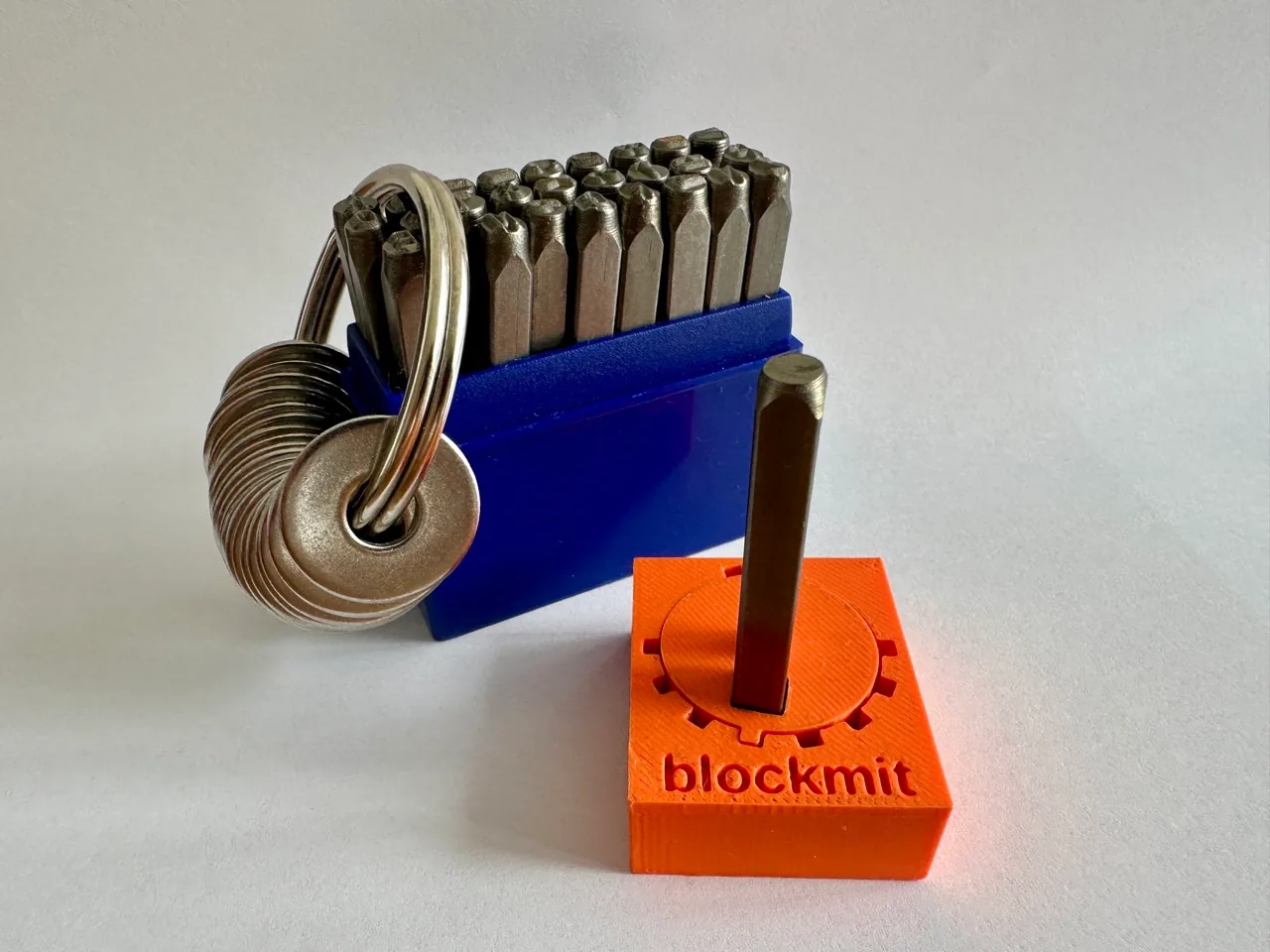
DIY steel seed.
Why I use banks (even though I don’t “love banks”)
Bitcoiners often dislike banks. I get it.
But as a physical security provider, a safe deposit box can be extremely useful:
- controlled access, ID checks, logging/monitoring
- business-hour-only access can actually be a feature
- you can operate calmly in a controlled environment
Yes, banks have risks (access limitations, restrictions, policy changes). So the setup must be designed such that no single bank is critical. Also: have you ever been inside a bank vault? Some of them are basically security art — you walk in and instantly feel safer. It’s an experience.
If both banks restrict access, you should still have a path using physical storage plus trusted people. And if there were coordinated pressure on banks to surrender what they have, banks alone should still be unable to move funds.
Extra layer at banks: tamper-evident sealed envelopes
One practical concern with bank deposit boxes is simple: you can’t observe what happens when you’re not there.
To add a cheap but effective integrity check, you can seal any seed material stored at a bank inside a tamper-evident evidence-style bag/envelope (the kind police use for evidence). The goal isn’t to make theft impossible—it’s to make unauthorized access detectable.
How to use it (high-level):
- Seed backup goes into the tamper-evident bag
- Record the seal/serial number (and optionally a photo)
- If the seal is broken or the number doesn’t match, assume compromise and rotate that key
It’s a simple step, but it buys peace of mind: if someone at the bank (or anyone else who somehow accessed the box) looked inside, you’ll have a visible signal.
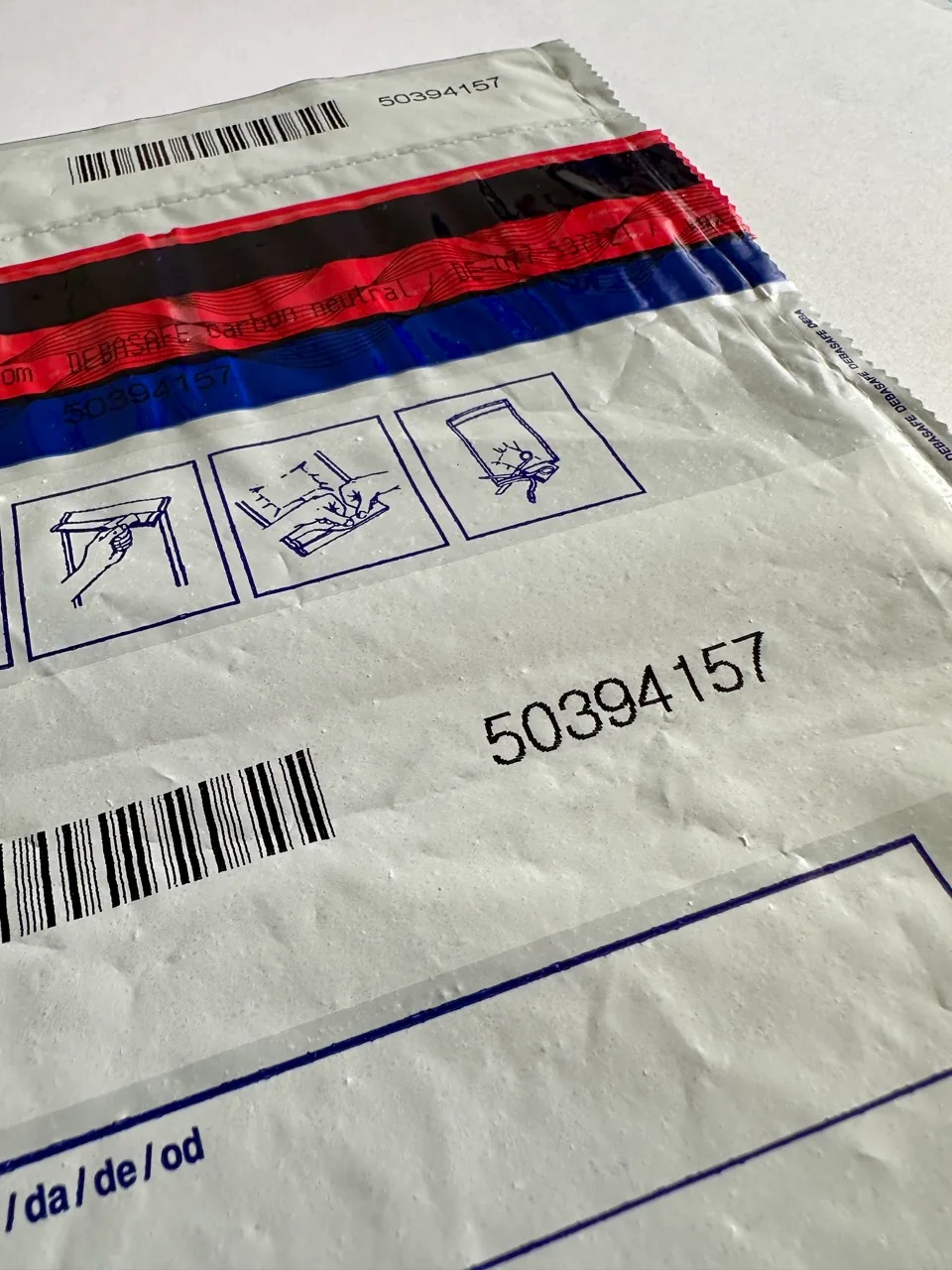
Tamper-evident sealed envelope.
A safe 2-of-3 pattern (example with two banks)
A concrete example helps — so here’s a real-world 2-of-3 pattern that uses two bank deposit boxes and two countries, but still avoids publishing a full map (no bank names, no cities, no addresses).
Assumptions:
- You have two trusted people: Person A in Country A and Person B in Country B.
- You want the ability to spend in either country, while keeping any single location/institution from having enough to move funds.
Example layout (2-of-3 multisig + passphrases)
Country A
-
Location 1: Physical storage (e.g., safe/lockbox) — access: you + Person A
- Seed 1
- Passphrase 2
- Passphrase 3
- Wallet descriptor (or recovery metadata)
-
Location 2: Bank deposit box (Bank 1) — access: you + Person A
- Seed 2
- Passphrase 1
Country B
-
Location 3: Physical storage (e.g., safe/lockbox) — access: you + Person B
- Seed 3
- Passphrase 1
- Wallet descriptor (or recovery metadata)
-
Location 4: Bank deposit box (Bank 2) — access: you + Person B
- Seed 1 (redundant copy)
- Passphrase 3
Why this pattern works (plain language)
- In Country A, you can assemble the pieces needed to use Seed 1 + Seed 2 (2-of-3), including the needed passphrases.
- In Country B, you can assemble the pieces needed to use Seed 1 + Seed 3 (2-of-3), including the needed passphrases.
- If both banks restrict access, you still have a path using the two physical locations plus trusted people.
- Even if both banks somehow had the right seeds, they still couldn’t spend from your wallet on their own, because they wouldn’t have the required passphrases (and, ideally, not the full recovery metadata either).
This isn’t “the” correct setup — it’s one proven pattern. Tune it to your threat model and keep it understandable. Inheritance deserves its own post (instructions, testing recovery, legal context), so I’m not going deep into it here.
Physical storage: options to consider
There are many ways to do physical storage (safe deposit boxes, home safes, lockboxes, concealed mounts, etc.). The main goal is simple: protect critical components behind real physical security, not just a hiding spot.
If you want something relatively small and “good enough” for many scenarios, you can look at compact models like the Burg-Wächter Combi-Line CL 410 E — manufacturer: https://burg.biz/en/products/combi-line-cl-410-e — it’s often good value for the price, offering solid fire protection and a higher level of burglary resistance than a basic lockbox.
Also, think about the access method:
- Key-only models can be very secure, but then you have to manage (and securely hide) an extra physical key.
- A PIN-based lock can be a nice balance of safety and convenience, and it can be easier to store/recover the code (for example in a password manager) without leaving a physical key lying around.
Whether it’s the right choice for you depends on your risk profile and what you’re protecting.
Wallet descriptor storage: don’t keep it “loose”
The wallet descriptor is not a private key by itself, but losing it can turn recovery into painful trial and error. Treat it like critical recovery metadata, and also as privacy-sensitive information. In the wrong hands, it can help someone identify and link your wallet addresses, even if they still cannot spend without your keys.
A solid approach is to store the descriptor on a hardware-encrypted USB key (or another offline medium you trust), keep redundant copies in separate locations, and protect access with a strong password.
One example of this category is the Kingston IronKey D500S — manufacturer: https://www.kingston.com/en/usb-flash-drives/ironkey-d500s-encrypted — but the broader recommendation is the category: offline + encrypted + redundant.
Privacy when buying security-related devices
If you order a hardware wallet, safe, or any security-related device, think about the metadata you create (shipping address, email, phone).
A practical move: ship to a non-home address (work, pickup point, trusted friend), so a leaked customer list doesn’t trivially map “security-device owner → home address.”
You can also use a VPN while ordering to reduce how directly your IP address maps to your location. (Not magic—just reducing easy signals.)
What will this cost?
Multisig is not “free.” You are buying resilience and sleep.
Here are ballpark numbers (EUR) to make it concrete:
- Bank safe deposit box (yearly): ~€80–€150 per bank
- Hardware wallet / signer (one-time): ~€100–€150
- Stateless signing helper device (one-time): ~€100 (optional)
- Steel backup per seed (one-time): ~€60 each
- Hardware-encrypted USB key for descriptor (one-time): ~€100 each
- Safe / lockbox (one-time): ~€400–€800 each
- Tamper-evident evidence envelope (one-time): ~€2–€5 each
Example budgets (rough)
To avoid turning this into a “here’s my exact security blueprint,” I’ll keep this at ranges:
- Lean setup (1 location + 1 bank + simple redundancy): often lands in the low four figures one-time, with one yearly bank fee.
- Robust setup (multiple locations + multiple banks + stronger redundancy): can land in the mid four figures one-time, with multiple yearly bank fees.
The important part isn’t the number — it’s whether the cost buys you the right mix of independence, recoverability, and sleep-at-night factor for your situation.
The digital alternative: collaborative custody (services instead of physical logistics)
Not everyone wants banks, safes in multiple locations, or cross-border logistics. That’s where collaborative custody services come in.
These services aim to give you:
- multisig security
- strong UX
- guided recovery / inheritance features
- less physical logistics
You generally pay a yearly fee, and the service can hold one key (or, depending on the model, multiple keys / key material) in a way that can’t move funds alone.
Examples you can explore:
- Casa: https://casa.io/
- Nunchuk: https://nunchuk.io/
- Swan Vault: https://www.swanbitcoin.com/vault/
The tradeoff is still simple, but the details matter:
-
Physical route (DIY multisig + physical storage):
- Pros: maximum independence (no company required to operate), long-term survivability if you document it well, no subscription dependency, you control where every piece lives.
- Cons: more logistics (locations, people, access paths), you must build your own “inheritance layer” (instructions, testing, trusted people), and you’re responsible for maintenance (rotations, audits, recovery drills).
-
Service route (Casa / Nunchuk / Swan Vault, etc.):
- Pros: easier UX, guided setup, ongoing support, and often built-in inheritance/recovery features (this is a big deal if you want your family to have a smoother path).
- Cons: ongoing yearly fee, you’re adding a company dependency, and you should plan for the day the service is no longer available. If the provider shuts down or changes terms, you may need to migrate and effectively re-do parts of your setup (new coordinator, new signing flow, potentially new keys depending on the model).
Both can be valid. It depends on whether you’re optimizing for simplicity, long-term independence, recovery support, inheritance workflows, or paranoia level.
How to improve your multisig setup further: programmable wallets with Miniscript
Once you understand multisig storage, the next frontier is programmable spending conditions.
Miniscript is a structured way to represent and reason about Bitcoin spending policies.
What this enables (high-level examples):
- Time locks: funds can’t be spent until a certain time or block height.
- Fallback paths: a normal spending policy today, and a different recovery policy later.
Example concept:
- Savings for a kid: the funds are spendable by your child only after they turn 18 (timelock).
- Parent safety valve: you can still spend anytime using your existing 2-of-3 multisig path (e.g., to rebalance, rotate keys, or handle emergencies).
This is powerful, but it deserves its own post, because complexity cuts both ways: it can make you safer, or it can make recovery harder if you don’t document and test it properly.
The good news: collaborative custody solutions can make these ideas much easier to use in practice — for example, tools like Nunchuk can help you create more programmable wallets with your own custom conditions, without building everything from scratch.
The biggest lesson learned: I sleep better
The best “feature” of a serious custody setup is not technical. It is psychological.
If you’ve ever paid off a mortgage (or any big debt), you know the feeling: you think you understand it… until it happens. Then it’s like a big rock quietly slides off your chest. You breathe differently. You stop checking. You feel lighter.
That’s what good custody feels like:
- I don’t trade because access is intentionally inconvenient.
- I worry less because compromising one location isn’t enough.
- I know recovery is possible without relying on luck or memory.
- I know there’s a clear plan in place for recovery if I’m not present (this deserves its own dedicated article).
There is no perfect setup, only tradeoffs. The goal is balance:
Make it hard enough that thieves don’t bother trying — but not so hard that you lock yourself out. Build a setup where the right people can help recover funds if you want them to, and tune the paranoia level to your own risk profile.
What you can do
If you’re reading this and thinking “OK, where do I start?”, here are two practical paths.
If you’re new
- Define what “meaningful money” means for you.
- Move that amount off the exchange into a simple cold-storage setup (if you want a beginner-friendly starting point, start with Trezor).
- Turn on PIN + passphrase protection where appropriate.
- Store the backup offline (paper at minimum; steel if you can) — and store it separately from the hardware wallet, ideally in a different physical location.
- Do one basic reality check: can you restore the wallet from the backup? (Test with a small amount first.)
If you’re more technical — or you have meaningful funds and want higher security
- Consider 2-of-3 multisig if your stack and threat model justify the extra complexity and cost.
- Design the storage topology first (locations, people, access paths), then implement.
- Treat the descriptor as recovery-critical metadata and store it deliberately.
- If physical logistics (banks/safes) feel heavy — or you simply want better ease-of-use / UX — evaluate collaborative custody services as a tradeoff.
Your Node, Your Rules - From Wallet to Full Bitcoin Sovereignty
Most Bitcoin wallets quietly rely on someone else’s node. This is what it took me to close that gap myself, and why running my own node changed how Bitcoin feels.
I Got Hacked - Here Is What I Changed and Why I Sleep Better Now
I got hacked and it changed how I think about personal security. This is the framework I built — layered defenses, separated identities, and practical paranoia that works without making daily life unbearable.

The Bitcoin Inheritance Problem - Legal, Technical, and Human
Custody protects your Bitcoin while you’re alive. Inheritance planning protects it after you’re gone. This is how I think about the legal, technical, and very human problem of making sure the right people can actually recover what you built.