Blog
I Got Hacked - Here Is What I Changed and Why I Sleep Better Now
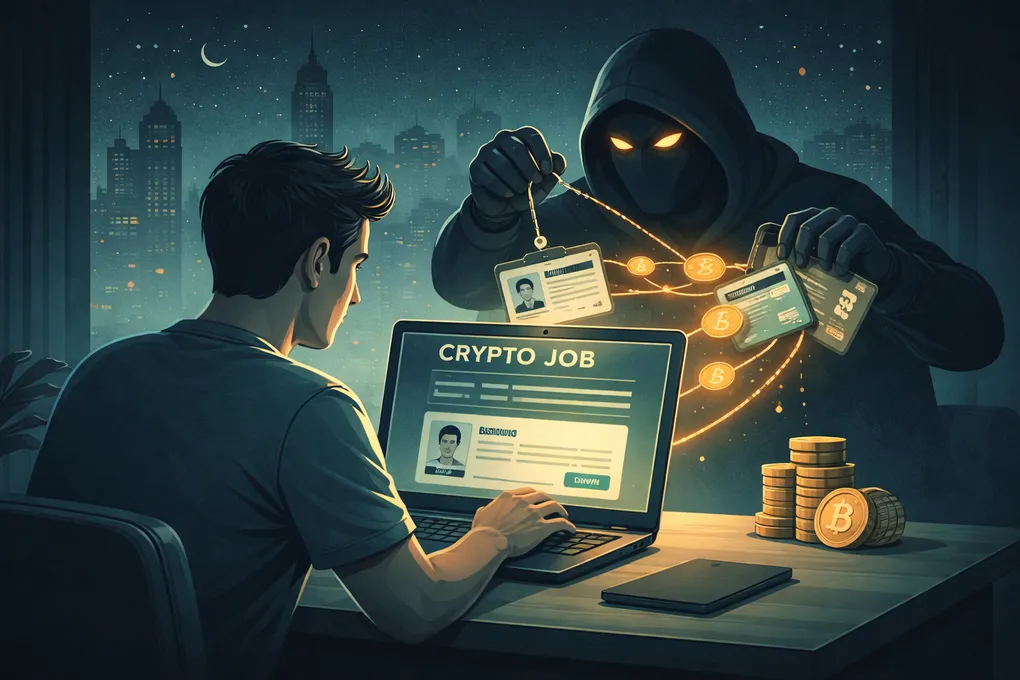
There is a weird kind of silence that hits when you realize you have been compromised.
No alarm. No dramatic red screen. No movie scene where everything flashes at once. Just that creeping feeling that something is off: a session you did not start, a notification you did not trigger, a file that moved when you were not looking.
That part is the worst. By the time you notice, the damage is usually already in motion.
I got hacked. It changed how I think about personal security.
This is not a fear piece. It is what I built after the fact: layered defenses, separated identities, and a level of practical paranoia that helps me sleep without turning daily life into a bunker.
The Threat Is Not What You Think
Most people still picture hackers as someone in a dark room writing code. The truth is less cinematic and a lot more effective.
Most successful attacks do not begin with malware. They begin with a conversation. A message. A phone call that feels real enough in the moment.
Social engineering, meaning tricking people into giving up access, information, or control, drives a huge share of security incidents now. In 2025, it was tied to more than 60% of crypto-related incidents according to multiple industry reports. And this is not just a crypto problem. Bank accounts, email, cloud storage, investment platforms, basically your whole digital life, are all in play.
Here is what the attacks actually look like today:
Fake job interviews. State-sponsored groups and organized criminals create entire fake companies — complete with websites, LinkedIn profiles, and GitHub repositories. They reach out with attractive job offers, conduct what feels like a real interview process, and then ask you to download a coding test, run a project file, or install a tool. The moment you execute that code, your device is compromised. Your browser sessions, passwords, crypto wallets, and files are silently exfiltrated. This is not hypothetical — Microsoft, Google, and multiple security firms have documented active campaigns running exactly this playbook throughout 2025 and into 2026.
Phishing that no longer looks like phishing. The days of obvious misspelled emails are fading. AI-generated phishing messages now match the tone, formatting, and context of real communications. They arrive as SMS, email, WhatsApp messages, and even calendar invites. Some impersonate your bank. Others impersonate government agencies. The best ones impersonate people you know.
Phone calls from people who are not who they say they are. Someone calls claiming to be from your bank’s fraud department. They know your name, your account details, and the last transaction you made. They create urgency — “your account is being accessed right now, we need to verify” — and walk you through steps that hand them control. With AI voice cloning, these calls can now sound like anyone. Your colleague. Your partner. Your parent.
Impersonation of family and friends. A message arrives from someone you trust. The profile picture is right. The writing style is close enough. They need help urgently — a transfer, a password, access to something. It is not them.
These are not weird edge cases anymore. This is the mainstream playbook now, and it keeps getting better.
What Actually Happens When They Get In
In most cases, the goal is not to break into some vault. It is to get you to open the door for them.
The chain usually looks boring. You get tricked into downloading software, running a script, clicking a link, or approving access. That compromises the device. From there, the attacker grabs whatever they can reach: browser sessions, which usually means every service you are logged into, saved passwords, authentication tokens, files on your machine and in the cloud, wallet data, and sometimes keystrokes too.
If you have a hot wallet on your phone or computer, it is gone. There is no recovery. Crypto transactions are irreversible. If the attacker finds wallet files, seed phrases, or active sessions to exchanges, the funds move in seconds.
But this is not just about crypto. They can drain bank accounts through live sessions. They can steal your identity from passport scans and tax documents sitting in your downloads folder. They can lock you out of your email, which is basically the reset button for half your life.
The damage scales with how much of your life lives on the device they compromised.
Why I Changed Everything
I got hacked. The exact story is not the point here. What matters is what it forced me to admit.
Before it happened, I thought I was careful. I was technical. I understood the risks in theory. But theory is cheap. Practice is where you find out what your setup actually looks like under pressure.
The hack was not especially sophisticated. It was social engineering. Someone caught me in a moment where I was not paying enough attention, and that was enough.
Afterward I asked myself a question I should have asked much earlier: if someone compromised any one device I own right now, how far could they get?
The answer was ugly. Too far.
So I rebuilt the whole thing. It took about a month. It was tedious, annoying, and occasionally felt ridiculous. It was still worth it. When I was done, I had something I did not have before: a setup where one mistake or one compromised device could not unravel my entire digital life.
The Attacker’s Playbook — What to Watch For
Before I get into the setup, it helps to understand how these attacks work psychologically. The technical part matters, but the attack usually lands in your head before it lands on your device.
Urgency. The single most effective tool in social engineering. “Your account is being accessed right now.” “This offer expires in 10 minutes.” “We need to verify your identity immediately or your account will be locked.” Urgency bypasses your critical thinking. It makes you act before you evaluate. Every time you feel rushed, that is the moment to stop.
Isolation. Attackers want you alone in the decision. “Do not tell anyone about this call — it is a security protocol.” “Keep this confidential until the investigation is complete.” The moment someone asks you to keep a security interaction secret from the people you trust, you are being manipulated.
Authority. They impersonate people and institutions you respect — your bank, the police, a government agency, your employer, a well-known company. Authority creates compliance. You follow instructions because the source seems legitimate.
Familiarity. Impersonating someone you know exploits the deepest shortcut in human psychology — trust. A message from a friend asking for help does not trigger the same scrutiny as a message from a stranger.
Too good to be true. The job offer that pays twice market rate. The airdrop that requires “just one click.” The investment opportunity with guaranteed returns. If it feels too generous, it is not generosity — it is bait.
If you learn to spot these patterns, you stop a lot of attacks before they even start. Not because you are smarter than the attacker. Because you stop cooperating with the script they are trying to run on you.
The Framework I Built
What follows is not a step-by-step tutorial. It is the set of decisions and principles I ended up with, described at a level you can adapt to your own life. My OPSEC rules stop me from publishing exact tools and configurations, and that is deliberate. A security setup described in full detail on the public internet is not much of a security setup.
Start With Cold Storage
The first and most important rule: never store meaningful amounts of crypto in a hot wallet on a device you use daily. Not on your phone. Not on your laptop. Not on a desktop that connects to the internet.
If your long-term Bitcoin holdings are in cold storage — hardware wallets, offline signing devices, air-gapped setups — then even a full device compromise cannot touch them. The attacker gets your browser sessions, your files, maybe your email. They do not get your Bitcoin.
Cold storage is not about convenience. It is the wall between everything that can be hacked and the part that would really hurt to lose.
I covered custody in detail in a previous post:
https://miro.foremsec.com/blog/buying-bitcoin-is-easy-custody-is-the-problem-exchange-to-multisig/
Categorize Everything
One of the most useful changes I made was forcing myself to sort every tool, service, and account into four categories:
ADMIN — infrastructure-level tools that, if compromised, would cascade into everything else. Think: password manager, VPN, custom domain, authenticator app, primary encrypted email. These get the highest level of protection. Different credentials, hardware key authentication, isolated access.
ID — important personal and professional accounts. Professional networks, primary cloud services, communication platforms. These are valuable but contained — losing one does not cascade into losing others.
COMMS — day-to-day services. Newsletters, e-commerce, food delivery, streaming. Useful but replaceable. Protected with unique passwords but not with the same intensity as the first two tiers.
JUNK — anything that requires an account but does not deserve real credentials. Throwaway email, minimal information, no connection to anything important.
Each tier gets a different email address, a different level of authentication, and a different amount of attention. The higher the tier, the more layers. That separation matters. If a COMMS-level account gets breached, there should be nothing there that helps the attacker climb upward.
Two Phone Numbers
I keep two phones. One is a normal smartphone for day-to-day use. Browsing, messaging, apps, the usual. The other is a simple device with limited functionality. No camera. No apps. No smartphone operating system.
The second number is connected to critical services — banking, financial platforms, essential cloud accounts. It is never shared publicly. It never appears in any online profile, any form, any message to a stranger.
If an attacker gets control of your phone number through a SIM swap or by manipulating your carrier, they get a shot at every account tied to that number. Separating the numbers means the most valuable accounts sit behind a number the attacker does not even know exists.
One Password Manager, One Authenticator
Every password is unique, randomly generated, and stored in one password manager. No reused passwords. No “I will remember this one.” No passwords saved in the browser.
Every service that supports it gets two-factor authentication through a single authenticator app. The authenticator is backed up regularly and encrypted.
For the most critical services — ADMIN tier — authentication also requires a hardware security key. Multiple copies of the key exist, stored in separate geographic locations. One for daily use, the others as backups in case the primary is lost or damaged.
The point is simple: even if someone gets the password through a breach, phishing, or some compromised database, they still should not be able to get in. And for the most important accounts, even the second factor is not enough without the hardware key in hand.
Email Architecture
I use multiple email addresses from different providers, but none of them are the addresses I hand out directly to services.
Instead, I use a personal domain and create aliases. Every service gets a unique alias that forwards to the actual mailbox. The service knows me as [email protected]. It does not know which provider actually receives that email.
This does three useful things. First, if a service leaks my address, the attacker gets an alias, not the real mailbox. Second, if a provider goes down or gets compromised, I can redirect the alias somewhere else because I control the domain. Third, I can see exactly which service leaked my address by checking which alias starts receiving spam.
Using single sign-on (SSO) through a major provider is convenient. But it is a single point of failure. If that provider account is compromised, every service connected to it is compromised. I avoid it for anything above the COMMS tier.
Browser Isolation
I use multiple browser profiles. The one for banking and financial services is set to delete everything when it closes: history, cookies, sessions, cached credentials, the lot.
That means even if malware grabs a snapshot of the running browser, there is much less sitting there from previous sessions. Every login is fresh. Every session is temporary. A profile that remembers nothing gives away a lot less.
VPN on Everything
Every device that connects to a network runs through a VPN where possible. Phone, computer, even home devices. This is not me pretending I can become invisible. It is about reducing easy interception on shared networks and leaking less metadata than necessary to providers and ISPs.
Encrypted Cloud and Physical Backups
Sensitive files never go into the cloud unencrypted. Anything important, documents, records, backup files, gets encrypted locally before it goes anywhere. The encryption password is separate from account passwords and is not stored digitally.
I also keep physical backups on drives stored in separate locations. Cloud services can get hacked, change terms, or just disappear at the wrong moment. Physical drives you control are boring, which is exactly why they are useful.
Protect the Whole Family
This is the part a lot of people miss. You can harden your own setup, then your partner clicks the wrong link, your child installs something sketchy, or a family member reuses a password, and suddenly the problem walks in through the side door.
I extended the core basics to everyone in my household. Not at the same paranoia level, because that would be unbearable, but the basics: unique passwords, a password manager, two-factor authentication where it matters, phishing awareness, and one simple rule: if something feels off, stop and ask before you click.
Family members are also potential targets for impersonation attacks. We established verbal verification — simple things that only we would know — so that if a message or call claims to be from a family member and asks for something unusual, we can verify before acting.
Question Every Device
This one is easy to overlook. You add a smart speaker, a camera, a home automation hub, a local AI server, and each one becomes a possible entry point. Anything on your home network that talks to the internet is part of the attack surface whether you think about it that way or not.
For each device, ask: what data does it have access to? What network segments can it reach? What happens if it is compromised? If you are running anything that processes sensitive data — especially a local AI setup or a Bitcoin node — isolate it. Network segmentation, access controls, and regular firmware updates are not optional.
Ship Sensitive Products Elsewhere
If you order hardware that strongly signals you hold crypto, hardware wallets, security keys, specialized gear, think about sending it somewhere that is not your home. Delivery databases leak. Shipping records get compromised. “This person ordered three hardware wallets” plus a physical address is not a great combination.
Home Security
This crosses from digital into physical, but that boundary is thinner than people like to think. Physical attacks on crypto holders, sometimes called wrench attacks, rose sharply in 2025, with recorded incidents nearly doubling from previous years.
A home alarm system, cameras, and physical security measures are worth it. But the deeper rule is simpler: do not keep anything at home that turns one break-in into total loss. Backups in other locations, multisig setups, and spreading critical materials across places mean a physical intrusion does not automatically become a catastrophic one.
The Hardest Part Is Maintenance
Building the setup was one thing. Living with it is something else.
Following your own rules every day gets annoying. There are always moments when you want to skip a step, reuse a password, log in from the wrong browser profile, or turn off the VPN because the connection is slow.
That is the real cost. Not the money. Not the hardware. The repeated decision to do the slightly more annoying thing because the convenient thing can blow up in ways you cannot reverse.
I review my setup periodically. I check for accounts I no longer use. I rotate what needs rotating. I make sure the family is still following the basics. It is not dramatic. It is not fun. But it is the price of sleeping well.
Define Your Strategy, Then Do the Work
If there is one takeaway here, it is this: most people will not do this until something goes wrong. That is just human nature. The threat feels abstract until it becomes personal.
But you do not have to do everything at once.
Start by asking one question: what is the most valuable thing I have digitally, and how well is it protected?
If the answer makes you uncomfortable, fix that one thing. Then move to the next most valuable. Then the next. Build outward from what matters most.
The full audit took me about a month. I went through every account, every password, every email address, every device, every storage location. I categorized everything. I migrated what needed migrating. I deleted what should not have existed anymore.
It was tedious. It was frustrating. There were accounts I had forgotten existed. There were passwords I had reused without realizing it. There were files in cloud storage that had no business being there.
But when it was done, I had something I had never really had before: clarity. I knew what I had, where it lived, and how it was protected. More importantly, I knew that one compromised device or one breached service was no longer enough to take everything down.
What You Can Do
If you are just getting started
Pick the most valuable thing you own digitally. Bitcoin. Bank access. Email. Whatever would hurt most. Then check how it is protected right now. If the answer is “a password I also use somewhere else,” fix that today. One password manager. One unique password. One step.
Then ask yourself: if someone stole my phone right now, what could they access? The answer will tell you where to focus next.
If you are ready for the full audit
Map everything. Every account, every device, every email, every file. Categorize into tiers based on value. Assign protection levels. Separate identities. Set up hardware keys for critical services. Encrypt your sensitive files. Extend the basics to your family.
It will take weeks, not hours. It will be uncomfortable. You will find things you wish you had fixed years ago.
Do it anyway. The clarity on the other side is worth every minute.
Disclosure
I got hacked. That part is real. Specific details about the incident are intentionally omitted for security reasons.
Some details in this article are intentionally generalized. The principles are real. The exact configurations are kept vague on purpose — because a detailed public blueprint of your security setup is not a security setup. It is a vulnerability.

Your Node, Your Rules - From Wallet to Full Bitcoin Sovereignty
Most Bitcoin wallets quietly rely on someone else’s node. This is what it took me to close that gap myself, and why running my own node changed how Bitcoin feels.

The Bitcoin Inheritance Problem - Legal, Technical, and Human
Custody protects your Bitcoin while you’re alive. Inheritance planning protects it after you’re gone. This is how I think about the legal, technical, and very human problem of making sure the right people can actually recover what you built.
Buying Bitcoin is easy. Custody is the problem - From exchange to multisig.
Buying Bitcoin is the easy part. Keeping it safe for years is where things get real. This is how I moved from exchanges to cold storage and eventually to 2-of-3 multisig, and what I learned in the process.